Create Account

Saturday 31st October 2026 | Telephone numbers on TPS: 13,484,050 | Telephone numbers on CTPS: 1,075,998 | Total numbers registered: 14,560,048

Getting Started

To screen your numbers, just follow these five easy steps:

Prefer us to do it for you? See TPS and CTPS Managed Checks. Want screening built into your own software? See the TPS and CTPS API. Otherwise, just follow the steps below.

Step 1

Step 1: Create Account

  • Please create an account here and you will receive an email asking you to confirm your registration.
  • Please click on the link in the email you receive to activate your account.
  • You will then receive another email confirming your password and user name.
  • Use this information to return to the website and login to your account.
Create Account

Step 2

Step 2: Instant Quote

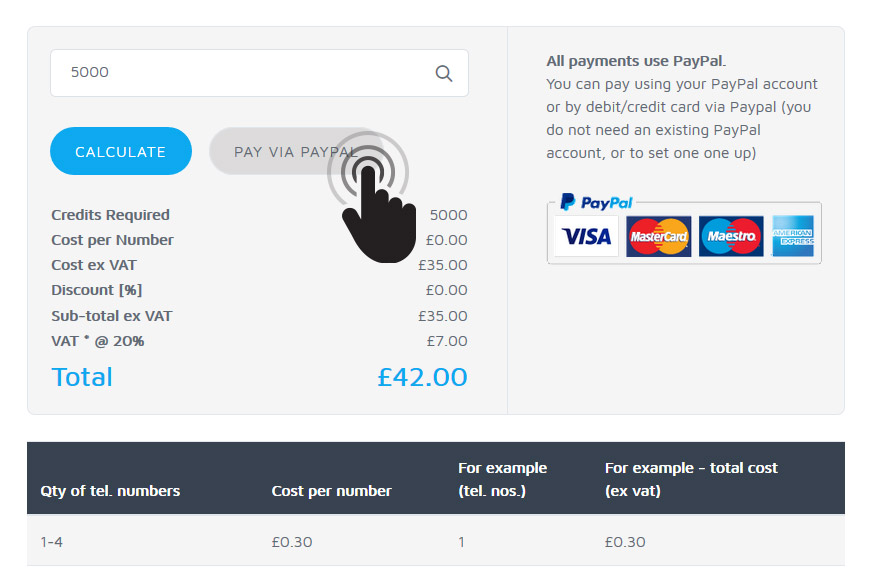
  • On the Pricing page, enter how many telephone numbers you would like to TPS check. You can do this before you log in.
  • Click the ‘Calculate’ button to receive your instant quote.
  • Our checker screens against both the TPS and CTPS registers automatically.

Step 3

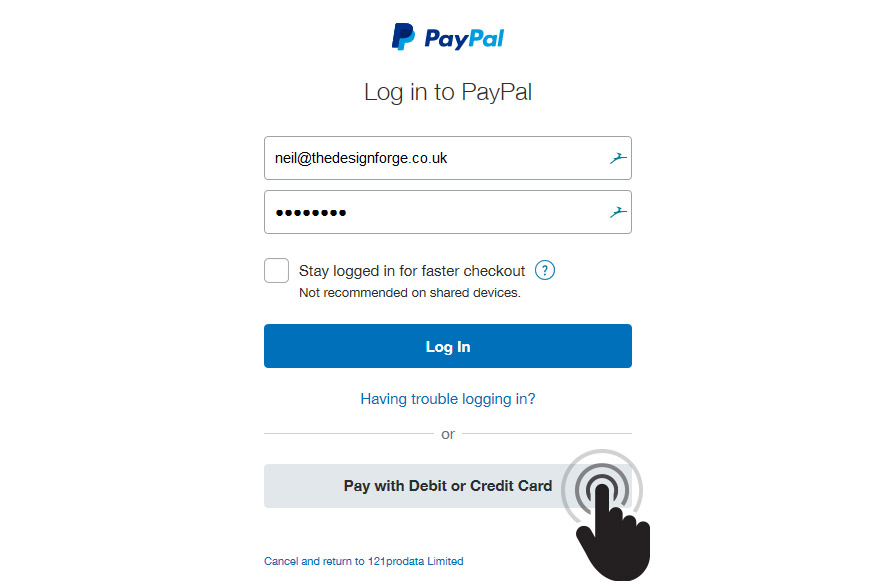
Step 3: Payment


Step 4

Step 4: Submit your list or single telephone numbers

Check a List of Numbers

  1. Put your telephone numbers in the first column/field of your file and ‘Save As’ a .csv (comma separated value – recommended) or a .txt (text) file.
  2. Check your numbers against the ‘Before you upload’ list below.
  3. Log into your Account and select ‘Check a list of numbers’. Change the reference number if you would like to. You can also use the ‘CC Email Copy’ box to send your results to another email address.
  4. Click the ‘Browse’ button to select your file of numbers, then click the ‘Upload File and Generate Email’ button to start the automated check.
Before you upload
  • Include the area code e.g. 01451 860805 or 1451860805 i.e. with or without a leading zero and with or without spaces.
  • Remove extension numbers e.g. x2345 or any other digits after the telephone number.
  • Include only one telephone number per record. The checker cannot screen multiple numbers in the same cell/field e.g. 07802861197/01451860805.
  • Don’t worry about including text or non-numeric characters e.g. ()-?/ etc. as the checker will ignore these and only check numbers 0-9.
  • It’s OK to include international dialling codes e.g. +44 or 0044. The checker will remove these for the purposes of screening only.

Adding your own data: You can include additional data in addition to the phone number e.g. reference numbers. Please add this data in fields 2, 3, 4 etc. reserving field 1 for the telephone number. The C/TPS flags will be appended to the right hand side of the fields you include.

The checker does not remove or re-order any of your records. The output (or 'Modified' file) will contain your complete list of numbers, in the same sequence. This means that you can cut and paste the output directly into a spreadsheet if you're using one.


Check a Single Number

  • Log in to your Account and click on ‘Check a single number’ to check one or more numbers one at a time via your web browser.
  • Enter the telephone number that you would like to check in the box shown and click the button.
  • The results of your check will be displayed on screen to indicate whether the number is registered and to which register it has matched – and whether it is ‘safe’ to call or ‘do not call’.

The system retains a record of every number you check, providing you with an audit trail. To view this information, once logged in, click on the 'Account History' link.


Step 5

Step 5: Receive the results (for lists of numbers)

'Yes' means the number matches a register – DO NOT CALL. 'No' means the number is not registered and is safe to call.

  • You can receive the results in two ways:
    1. As a download link in your account (default): you will receive an email confirming that the check has been completed. Please login, go to 'Account History' and click on the link to download the C/TPS-checked file. The C/TPS-checked file will remain available for seven days. A summary of the numbers screened and matched will still be viewable via the 'Account History', to provide you with an audit trail.
    2. As an attachment via email: you will receive an email with the C/TPS-checked telephone numbers attached (called the ‘Modified File’) and a copy of your original file (for your reference).
  • The file contains all of your numbers in their original sequence, so you can paste them straight back into your original database and they will align perfectly, with the numbers that you should not call highlighted by appending the following to the end of the record:
    • 'Yes' or 'No' – 'Yes' indicates a match to C/TPS registers – i.e. DO NOT CALL. 'No' indicates that the number is not registered and is safe to call.
    • 'TPS' or 'CTPS' – indicates to which register your number matched.
    • A date and time stamp – indicates when you need to re-check the number again, in 28 days, if you intend to call the number again on or after the date shown.
  • A summary of all screening results will be saved in your 'Account History', including which numbers you screened and which ones matched with the C/TPS registers.

You may find this information helpful if you're new to TPS screening

FAQ TPS & the Law Preparing your numbers Still confused? Contact us